How to Use Python to Analyze SEO Data: A Reference Guide
Python can help eliminate repetitive SEO tasks when no tools can help you. Here are some practical Python applications for SEO.
Do you find yourself doing the same repetitive SEO tasks each day or facing challenges where there are not tools that can help you?
If so, it might be time for you to learn Python.
An initial investment of time and sweat will pay off in significantly increased productivity.
While I’m writing this article primarily for SEO professionals who are new to programming, I hope that it’ll be useful to those who already have a background in software or Python, but who are looking for an easy-to-scan reference to use in data analysis projects.
Python is easy to learn and I recommend you spend an afternoon walking over the official tutorial. I’m going to focus on practical applications for SEO.
When writing Python programs, you can decide between Python 2 or Python 3. It is better to write new programs in Python 3, but it is possible your system might come with Python 2 already installed, particularly if you use a Mac. Please also install Python 3 to be able to use this cheat sheet.
You can check your Python version using:
$python --version
Using Virtual Environments
When you complete your work, it is important to make sure other people in the community can reproduce your results. They will need to be able to install the same third-party libraries that you use, often using the exact same versions.
Python encourages creating virtual environments for this.
If your system comes with Python 2, please download and install Python 3 using the Anaconda distribution and run these steps in your command line.
You can import them at the beginning of your code like this:
import requestsfrom requests_html import HTMLSessionimport pandas as pd
As you require more third-party libraries in your programs, you need an easy way to keep track of them and help others set up your scripts easily.
You can export all the libraries (and their version numbers) installed in your virtual environment using:
(seowork)$pip3 freeze > requirements.txt
When you share this file with your project, anybody else from the community can install all required libraries using this simple command in their own virtual environment:
(peer-seowork)$pip3 install -r requirements.txt
Using Jupyter Notebooks
When doing data analysis, I prefer to use Jupyter notebooks as they provide a more convenient environment than the command line. You can inspect the data you are working with and write your programs in an exploratory manner.
(seowork)$pip3 install jupyter
Then you can run the notebook using:
(seowork)$jupyter notebook
You will get the URL to open in your browser.
Alternatively, you can use Google Colaboratory which is part of GoogleDocs and requires no setup.
String Formatting
You will spend a lot of time in your programs preparing strings for input into different functions. Sometimes, you need to combine data from different sources, or convert from one format to another.
Say you want to programmatically fetch Google Analytics data. You can build an API URL using Google Analytics Query Explorer, and replace the parameter values to the API with placeholders using brackets. For example:
{metrics} is for the list of numeric parameters, i.e., “ga:users”, “ga:newUsers”
{dimensions} is the list of categorical parameters, i.e., “ga:landingPagePath”, “ga:date”
{segment} is the marketing segments. For SEO we want Organic Search, which is “gaid::-5”
{token} is the security access token you get from Google Analytics Query Explorer. It expires after an hour, and you need to run the query again (while authenticated) to get a new one.
{max_results} is the maximum number of results to get back up to 10,000 rows.
You can define Python variables to hold all these parameters. For example:
Python will replace each place holder with its corresponding value from the variables we are passing.
String Encoding
Encoding is another common string manipulation technique. Many APIs require strings formatted in a certain way.
For example, if one of your parameters is an absolute URL, you need to encode it before you insert it into the API string with placeholders.
from urllib import parseurl="https://healthroutedaily.co/"parse.quote(url)
The output will look like this: ‘https%3A//healthroutedaily.co/%E2%80%99%3C/i%3E which would be safe to pass to an API request.
Another example: say you want to generate title tags that include an ampersand (&) or angle brackets (<, >). Those need to be escaped to avoid confusing HTML parsers.
Similarly, if you read data that is encoded, you can revert it back.
html.unescape(escaped_title)
The output will read again like the original.
Date Formatting
It is very common to analyze time series data, and the date and time stamp values can come in many different formats. Python supports converting from dates to strings and back.
For example, after we get results from the Google Analytics API, we might want to parse the dates into datetime objects. This will make it easy to sort them or convert them from one string format to another.
Here %b, %d, etc are directives supported by strptime (used when reading dates) and strftime (used when writing them). You can find the full reference here.
Making API Requests
Now that we know how to format strings and build correct API requests, let see how we actually perform such requests.
r = requests.get(api_uri)
We can check the response to make sure we have valid data.
You should see a 200 status code. The content type of most APIs is generally JSON.
When you are checking redirect chains, you can use the redirect history parameter to see the full chain.
print(r.history)
In order to get the final URL, use:
print(r.url)
Data Extraction
A big part of your work is procuring the data you need to perform your analysis. The data will be available from different sources and formats. Let’s explore the most common.
Reading from JSON
Most APIs will return results in JSON format. We need to parse the data in this format into Python dictionaries. You can use the standard JSON library to do this.
Now you can easily access any data you need. For example:
print(parsed_response["website_name"])
The output would be:
"Search Engine Journal"
When you use the requests library to perform API calls, you don’t need to do this. The response object provides a convenient property for this.
parsed_response=r.json()
Reading from HTML Pages
Most of the data we need for SEO is going to be on client websites. While there is no shortage of awesome SEO crawlers, it is important to learn how to crawl yourself to do fancy stuff like automatically grouping pages by page types.
from requests_html import HTMLSessionsession = HTMLSession()r = session.get('https://healthroutedaily.co/')
If the page you are analyzing needs JavaScript rendering, you only need to add an extra line of code to support this.
from requests_html import HTMLSessionsession = HTMLSession()r = session.get('https://healthroutedaily.co/')r.html.render()
The first time you run render() will take a while because Chromium will be downloaded. Rendering Javascript is much slower than without rendering.
Reading from XHR requests
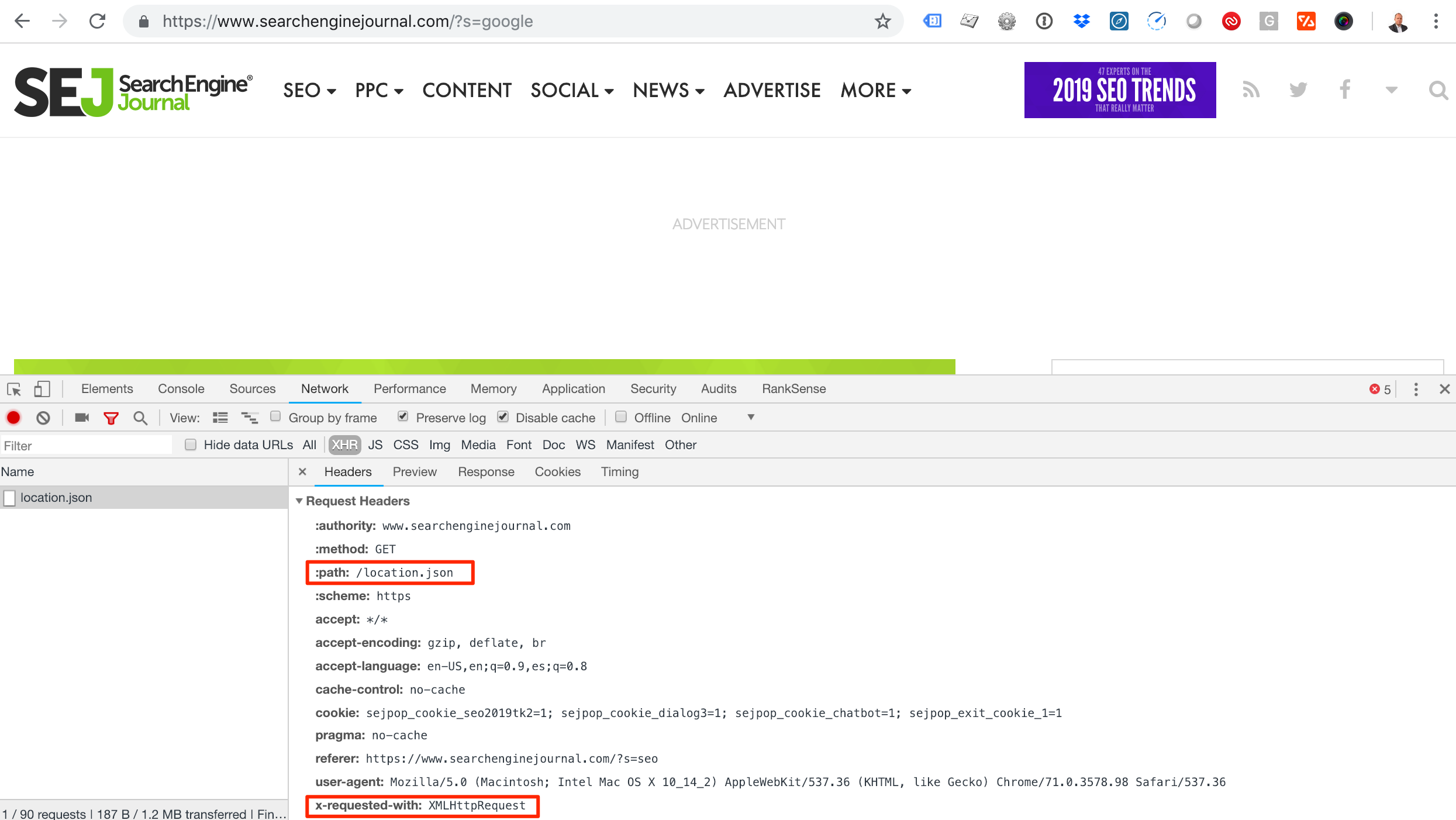
As rendering JavaScript is slow and time consuming, you can use this alternative approach for websites that load JavaScript content using AJAX requests.
Screenshot showing how to check the request headers of a JSON file using Chrome Developer tools. The path of the JSON file is highlighted, as is the x-requested-with header.
You will get the data you need faster as there is no JavaScript rendering or even HTML parsing involved.
Reading from Server Logs
Google Analytics is powerful but doesn’t record or present visits from most search engine crawlers. We can get that information directly from server log files.
Let’s see how we can analyze server log files using regular expressions in Python. You can check the regex that I’m using here.
You can learn about regular expression in Python here. Make sure to check the section about greedy vs. non-greedy expressions. I’m using non-greedy when creating the groups.
Verifying Googlebot
When performing log analysis to understand search bot behavior, it is important to exclude any fake requests, as anyone can pretend to be Googlebot by changing the user agent string.
Google provides a simple approach to do this here. Let’s see how to automate it with Python.
You get ‘66.249.66.1’, which shows that we have a real Googlebot IP as it matches our original IP we extracted from the server log.
Reading from URLs
An often-overlooked source of information is the actual webpage URLs. Most websites and content management systems include rich information in URLs. Let’s see how we can extract that.
It is possible to break URLs into their components using regular expressions, but it is much simpler and robust to use the standard library urllib for this.
from urllib.parse import urlparseurl="https://healthroutedaily.co/?s=google&search-orderby=relevance&searchfilter=0&search-date-from=January+1%2C+2016&search-date-to=January+7%2C+2019"parsed_url=urlparse(url)print(parsed_url)
We can continue and parse the date strings into Python datetime objects, which would allow you to perform date operations like calculating the number of days between the range. I will leave that as an exercise for you.
Another common technique to use in your analysis is to break the path portion of the URL by ‘/’ to get the parts. This is simple to do with the split function.
When you split URL paths this way, you can use this to group a large group of URLs by their top directories.
For example, you can find all products and all categories on an ecommerce website when the URL structure allows for this.
Performing Basic Analysis
You will spend most of your time getting the data into the right format for analysis. The analysis part is relatively straightforward, provided you know the right questions to ask.
Let’s start by loading a Screaming Frog crawl into a pandas dataframe.
import pandas as pddf = pd.DataFrame(pd.read_csv('internal_all.csv', header=1, parse_dates=['Last Modified']))print(df.dtypes)
The output shows all the columns available in the Screaming Frog file, and their Python types. I asked pandas to parse the Last Modified column into a Python datetime object.
Let’s perform some example analyses.
Grouping by Top Level Directory
First, let’s create a new column with the type of pages by splitting the path of the URLs and extracting the first directory name.